Pre-Installation Requirements: What You Need Before Your M Series Arrives
Setting up your Gweike M Series 6-in-1 machine requires proper preparation. Here’s everything you need to have ready before installation.
1. Electrical Requirements
| Specification | Value |
|---|---|
| Total power consumption | ≤5 kW |
| Voltage | 220V–240V |
| Frequency | 50–60 Hz |
| Main cable | 6 mm² |
Wiring Options
You have three options depending on your electrical setup:
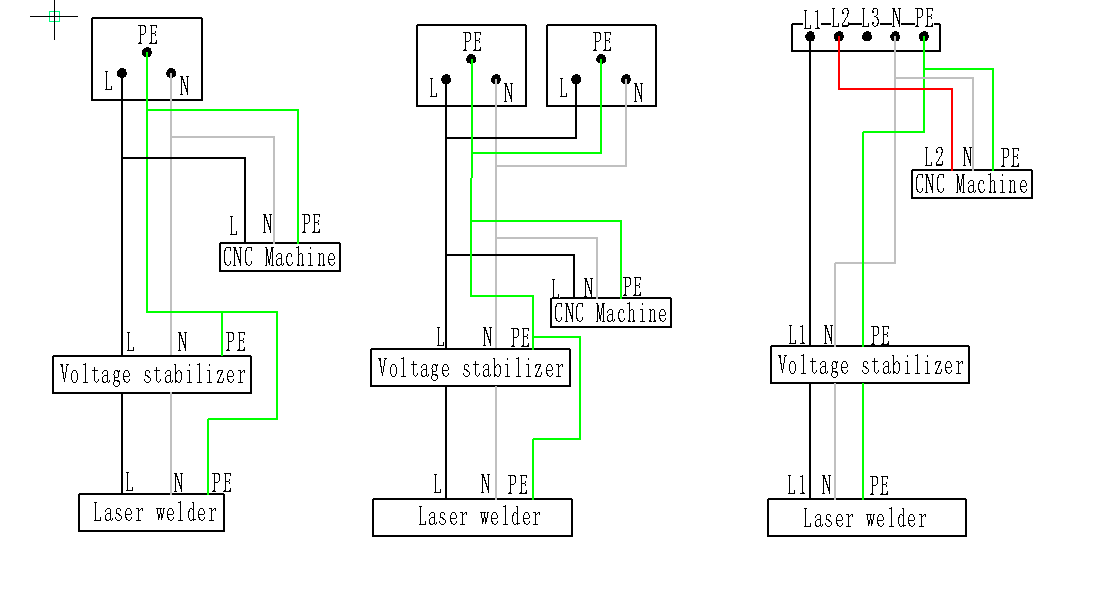
Left: Single-phase ≥30A | Center: Single-phase ≤16A (split) | Right: Three-phase
Option A: Single-phase ≥30A (Left diagram)
- One circuit with 30A or higher breaker
- Standard L-N-PE wiring
- Simplest solution if your panel supports it
Option B: Single-phase ≤16A (split load) (Center diagram)
- Two separate 16A circuits from the same phase
- One circuit for CNC machine + voltage stabilizer
- Second circuit for laser welder
- Useful when you only have 16A breakers available
Option C: Three-phase power (Right diagram)
- Each phase >20A
- Distribute loads across phases (L1, L2, L3)
Warning: Wiring must be done by a professional electrician.
Important: Startup Sequence
The machine has a built-in 500W smoke exhaust fan with a 5A starting current. Always activate the exhaust fan before turning on the laser welder to prevent circuit breaker tripping.
2. Gas Supply
| Gas Type | Maximum Pressure |
|---|---|
| Nitrogen | ≤2.5 MPa |
| Air | ≤1.6 MPa |
| Oxygen | ≤0.8 MPa |
Choose your gas based on the material you’re cutting:
- Nitrogen – Clean cuts on stainless steel, aluminum (no oxidation)
- Air – General purpose, economical for mild steel
- Oxygen – Faster cutting on carbon steel, creates oxide layer
3. Computer Requirements
| Requirement | Specification |
|---|---|
| Operating System | Windows 10 or Windows 11 |
| Computer Type | Laptop or Desktop |
| Connection | Ethernet (RJ45) |
Note: The machine connects via Ethernet cable, not USB. Make sure your computer has an available Ethernet port or use a USB-to-Ethernet adapter.
4. Water/Cooling System
The CO₂ laser section uses a water chiller that requires attention:
- Use only pure/distilled water
- Perform regular water quality checks
- Replace water periodically
Winter Operation
| Condition | Action Required |
|---|---|
| Temperature below 0°C | Do not operate – risk of laser tube damage |
| Winter months | Use laser-specific antifreeze only |
Pre-Installation Checklist
Before your machine arrives, confirm you have:
- Appropriate electrical circuit (30A single-phase or equivalent)
- Professional electrician scheduled for installation
- Gas supply arranged (nitrogen/air/oxygen as needed)
- Oil-free, water-free gas filtration
- Windows 10/11 computer with Ethernet port
- Distilled/pure water for chiller
- Laser-specific antifreeze (if winter installation)
- Adequate ventilation/exhaust system
Questions?
If you’re unsure about any requirements, post your questions below. Include:
- Your country (electrical standards vary)
- Your planned use case (which gases you’ll need)
- Your workspace setup
The community can help you prepare properly!
Source: Official Gweike “Preparation before Installation” document